INTRODUCTION TO 2D AND 3D CAD
Other Chapters
INTRODUCTION TO 2D AND 3D CAD2D SKETCHES (ASTM STANDARDS)DIMENSIONS AND CONSTRAINTS (ASTM STANDARDS)TOLERANCES (ASTM STANDARDS)SOLID MODELINGASSEMBLY MODELINGDRAWING VIEWPRESENTATION MODULESHEAR METAL COMPONENTSCAM (COMPUTER AIDED MANUFACTURING)PROCESS PLANNING
- Q1: What is SolidWorks?Ans: SolidWorks is a computer-aided design (CAD) software used to create 2D drawings and 3D models of mechanical components and products.
- Q2: State 4 uses of SolidWorks.Ans: Some uses of SolidWorks are:
- ➔ Creating 2D drawings
- ➔ Designing 3D models
- ➔ Assembly of parts
- ➔ Preparing engineering drawings
- Q3: What is the latest version of SolidWorks?Ans: The latest version of SolidWorks is the most recently released edition by Dassault Systèmes, which is updated every year with new features and improvements.
- Q4: Define 2D.Ans: 2D means two-dimensional representation which has only length and width.
- Q5: Define 3D.Ans: 3D means three-dimensional representation which has length, width, and height.
- Q6: Define Modules.Ans: Modules are different working environments in SolidWorks designed to perform specific tasks.
- Q7: Name the types of modules in SolidWorks.Ans: The types of modules are as follows:
- ➔ Part Module
- ➔ Assembly Module
- ➔ Drawing Module
- Q8: Define Part Module.Ans: Part Module is used to create individual 3D components or parts.
- Q9: Define Assembly Module.Ans: Assembly Module is used to combine multiple parts and define their relationships.
- Q10: Define Drawing Module.Ans: Drawing Module is used to create 2D drawings from 3D models.
- Q11: What are SolidWorks documents?Ans: SolidWorks documents are files created in SolidWorks such as part, assembly, and drawing files.
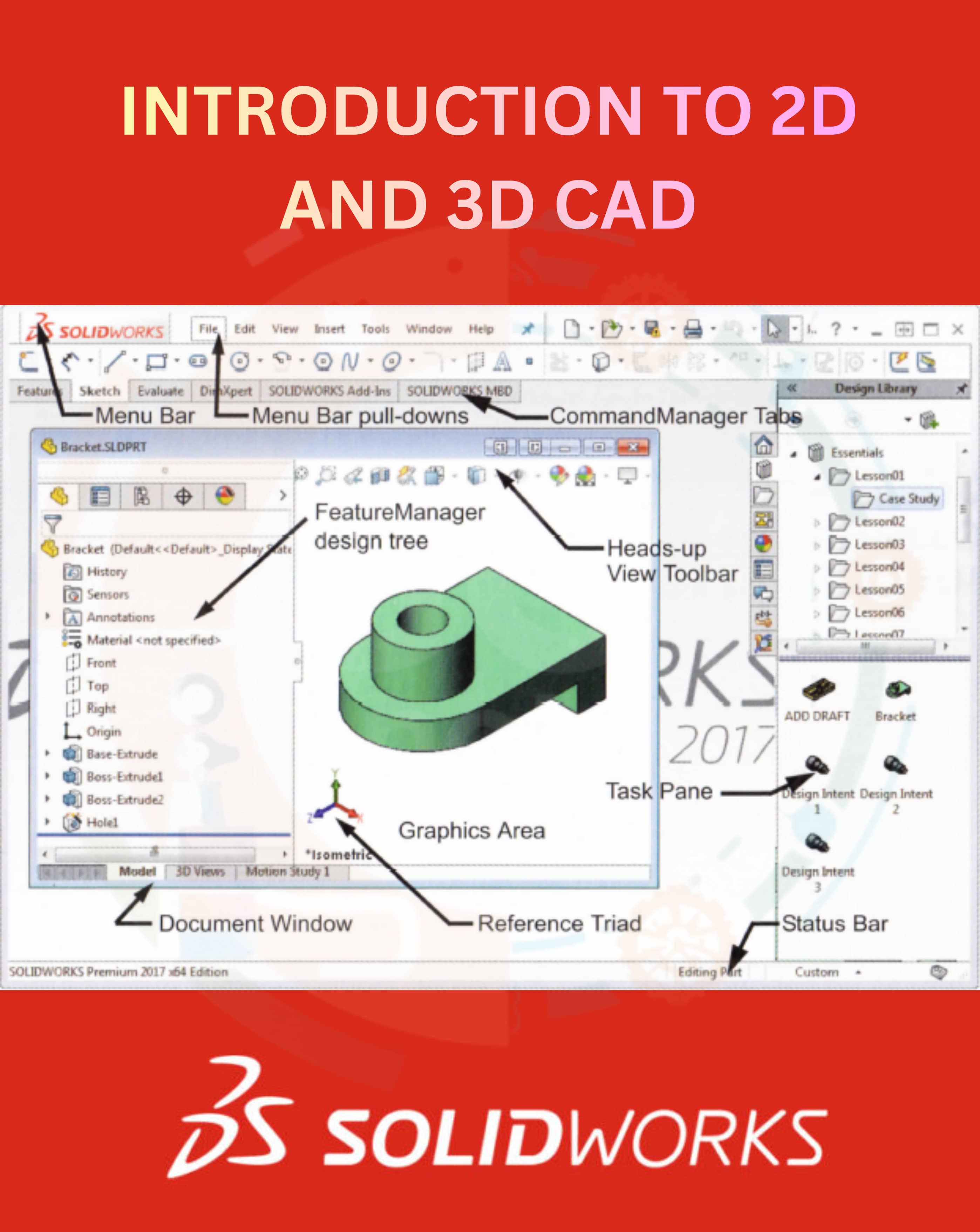
- Q12: Define Toolbars in SolidWorks.Ans: Toolbars are collections of icons that provide quick access to commands.
- Q13: Define Task Pane in SolidWorks.Ans: Task Pane is a side panel that provides access to resources like design library and file explorer.
- Q14: Define Status Bar in SolidWorks.Ans: Status Bar displays information about the current state of the model or command.
- Q15: Define Standard Toolbar in SolidWorks.Ans: Standard Toolbar contains commonly used commands like New, Open, Save, and Print.
- Q16: Define SolidWorks Menu.Ans: SolidWorks Menu provides access to all commands and tools in a drop-down format.
- Q17: Define SolidWorks Search.Ans: SolidWorks Search helps users quickly find commands, tools, and help topics.
- Q18: How can we invoke/open a new SolidWorks document?Ans: A new SolidWorks document can be opened by clicking on File → New or using the New icon on the toolbar.
- Q19: What is ANSI?Ans: ANSI stands for American National Standards Institute.
- Q20: What is ANSI standard?Ans: ANSI standard is a set of guidelines for engineering drawings followed mainly in the United States.
- Q21: How can we invoke/open the part modeling environment?Ans: The part modeling environment can be opened by selecting Part while creating a new document.
- Q22: Define Command Manager in SolidWorks.Ans: Command Manager is a toolbar that organizes tools into tabs based on their function.
- Q23: State some features of Command Manager in SolidWorks.Ans: Some features are:
- ➔ Tab-based interface
- ➔ Easy access to tools
- ➔ Customizable tabs
- Q24: What is Sketch Command Manager in SolidWorks?Ans: Sketch Command Manager contains tools used to create 2D sketches.
- Q25: What is Evaluate Command Manager in SolidWorks?Ans: Evaluate Command Manager is used to analyze mass properties, measurements, and geometry.
- Q26: What is the Surface Command Manager in SolidWorks?Ans: Surface Command Manager is used to create and modify surface models.
- Q27: What is Sheet Metal Command Manager in SolidWorks?Ans: Sheet Metal Command Manager is used to design sheet metal components.
- Q28: What is Weldments Command Manager in SolidWorks?Ans: Weldments Command Manager is used to create structural frames and welded structures.
- Q29: What is the Feature Manager Design Tree in SolidWorks?Ans: Feature Manager Design Tree shows all features, sketches, and components of the model.
- Q30: What is Assembly Command Manager in SolidWorks?Ans: Assembly Command Manager contains tools used for assembling parts.
- Q31: What is View Layout Command Manager in SolidWorks?Ans: View Layout Command Manager is used to control drawing views and layouts.
- Q32: What is Annotation Command Manager in SolidWorks?Ans: Annotation Command Manager is used to add dimensions, notes, and symbols.
- Q33: What is the View (Heads-up) Toolbar in SolidWorks?Ans: Heads-up Toolbar provides quick access to view-related commands.
- Q34: What is Animate in SolidWorks?Ans: Animate is used to create motion or visual movement of models.
- Q35: What is Axis in SolidWorks?Ans: Axis is a reference line used for modeling and alignment.
- Q36: What is Assembly in SolidWorks?Ans: Assembly is a collection of parts joined together.
- Q37: What is Boss/Base in SolidWorks?Ans: Boss/Base is a feature used to add material to create a solid shape.
- Q38: What is Profile in SolidWorks?Ans: Profile is the shape drawn in a sketch used to create features.
- Q39: What is Closed Profile in SolidWorks?Ans: Closed Profile is a sketch with fully connected edges.
- Q40: What is Open Profile in SolidWorks?Ans: Open Profile is a sketch that has open or unconnected edges.
- Q41: What are Planes in SolidWorks?Ans: Planes are flat reference surfaces used for sketching and modeling.
- Q42: What is Planar in SolidWorks?Ans: Planar refers to a flat surface lying on a single plane.
- Q43: What is the Configuration Manager in SolidWorks?Ans: Configuration Manager is used to create different versions of the same model.
- Q44: What is Degrees of Freedom in SolidWorks?Ans: Degrees of Freedom refer to the possible movements of a component.
- Q45: What is a Document in SolidWorks?Ans: A document is any file created in SolidWorks such as part, assembly, or drawing.
- Q46: What is Mate in SolidWorks?Ans: Mate is a tool used to define relationships between assembly components.
- Q47: What is a Model in SolidWorks?Ans: A model is a digital 2D or 3D representation of a component.
- Q48: Name any 6 terms used in SolidWorks.Ans: Some terms are:
- ➔ Sketch
- ➔ Feature
- ➔ Mate
- ➔ Plane
- ➔ Axis
- ➔ Configuration
- Q49: What is the file extension of the document created in the assembly environment in SolidWorks?Ans: The file extension is .SLDASM.
- Q50: What is the file extension of the document created in the part modelling environment in SolidWorks?Ans: The file extension is .SLDPRT.
- Q51: What is the file extension of the document created in the drawing environment in SolidWorks?Ans: The file extension is .SLDDRW.